

Data and Signals
in Pipeline Management

Most sales professionals still rely on gut feeling, personal preferences, and random check-ins to decide which leads to work on next. This guide shows you how to work the right leads at the right time by using data and buying signals.

Table of Contents
- Benefit of using Data and Signals in Lead Management
- Guide: How to Start Using Data and Signals in Lead Management
- Template: Measure & Optimize
- Quick Recap
Benefit of using Data and Signals in Lead Management
Monday. You open your CRM. 65 opportunities. You click the lead that just replied — even though they've been "evaluating" for eight months with no budget.
Tuesday. Your manager asks: "What's closing this month?" You pick the five that feel closest — most meetings, enthusiastic contacts, time invested. None mention budget.
Thursday. You've spent 18 hours on four leads. One is ghosting you after the proposal. One admits they're not the decision-maker — you've been talking to the wrong person for two months.
Friday. LinkedIn shows your competitor closed the deal you've chased for six months.
To avoid this mess, successful teams use data and signals to identify ready buyers, understand what indicates real intent, and invest time only where momentum exists.
→ Instead of working leads based on who responds or where you've invested time, you prioritize accounts showing objective signals: budget discussions, multiple stakeholders, procurement involvement, or competitive contract expirations.
→ Instead of following up because "it's been two weeks," you reach out when behavior changes: after they research pricing three times in one week, when a C-level joins the evaluation, or immediately when they engage with your ROI calculator.
Guide: How to Start Using Data and Signals in Lead Management
Step 1: Focus — Pick Your Pilot Group
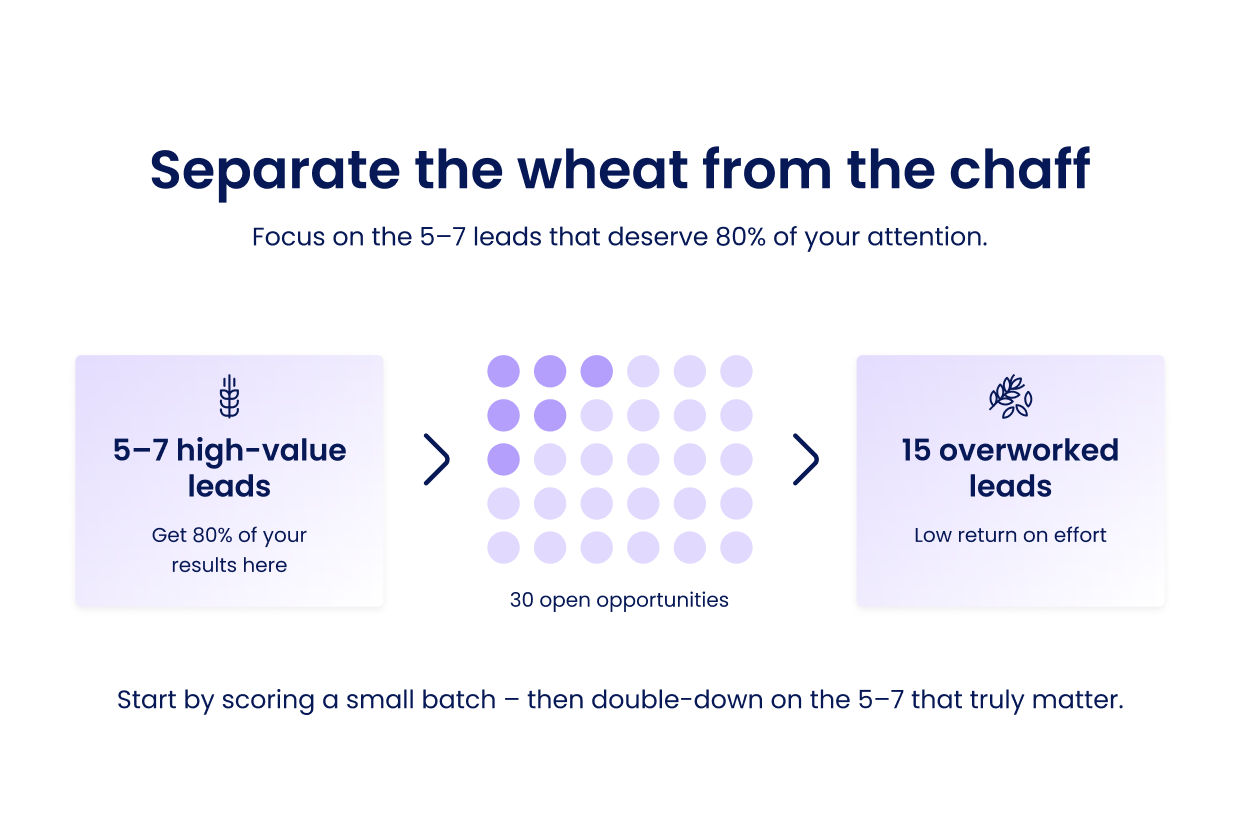
Don't try to score your entire pipeline on day one. Start with your top 30 open opportunities — the deals you believe have potential but lack clarity on priority.
Action: Export these 30 leads into a spreadsheet. You'll use this as your testing ground before automating anything in your CRM.
→ Within the first week, you'll already see which 5–7 leads deserve 80% of your attention — and which 15 you've been overworking.
Step 2: Define — Identify Your Key Buying Signals
Not all signals matter equally. Focus on the 3–5 that actually predict deal closure in your business. Pick 3–5 signals from the above that you can actually track today. Don't pick signals you can't measure yet.
Start with these proven categories:
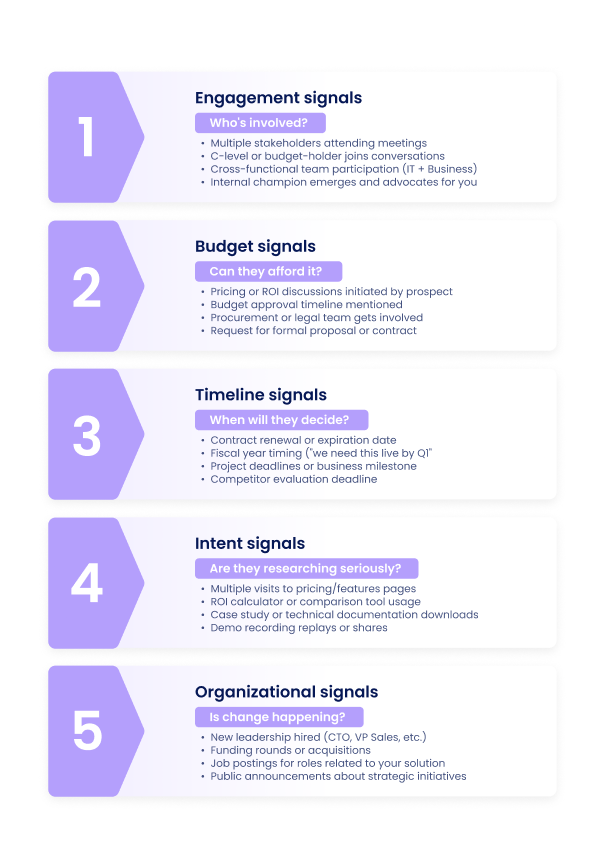
- Engagement signals (who's involved?)
- Budget signals (can they afford it?)
- Timeline signals (when will they decide?)
- Intent signals (are they researching seriously?)
- Organizational signals (is change happening?)
Example for a SaaS company:
- Multiple stakeholders in demo (Engagement)
- Pricing page visited 2+ times (Intent)
- Budget discussion documented in CRM (Budget)
- Timeline mentioned ("need by end of Q2") (Timeline)
- Procurement contact added to deal (Budget)
Step 3: Integrate — Connect Your Data Sources
You can't score leads without data flowing into one place. Most teams already have these tools — they just aren't connected.
→ This week, ensure your CRM captures at minimum: stakeholder count, last engagement date, and whether budget was discussed. Add these as required fields.
Essential integrations:
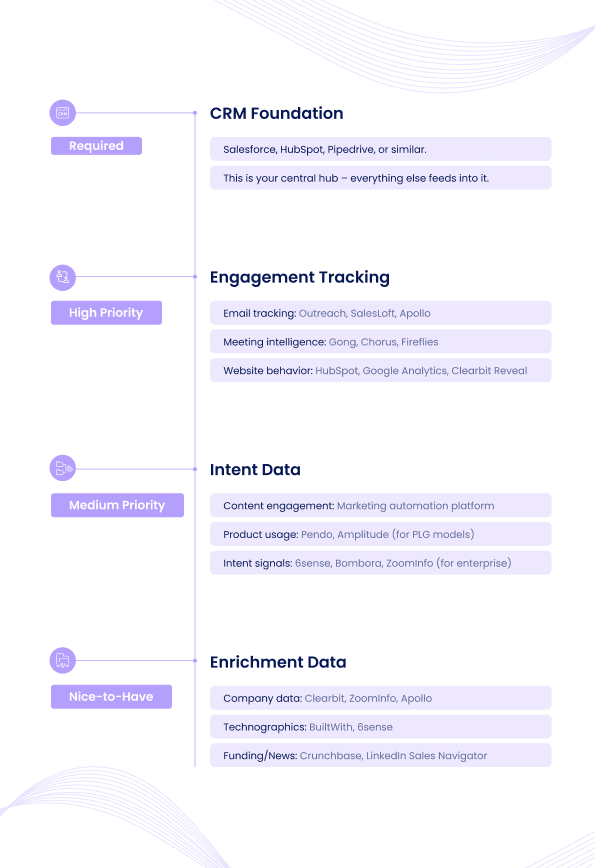
- CRM Foundation (Required)
- Engagement Tracking (High Priority)
- Intent Data (Medium Priority)
- Enrichment Data (Nice-to-Have)
→ Start simple! If you don't have fancy tools yet, manually track signals in custom CRM fields:
- "Budget discussed?" (Yes/No)
- "Stakeholder count" (Number)
- "Last meaningful engagement" (Date)
- "Intent score - manual" (1–10)
Step 4: Automate — Set Simple Scoring Rules
Now turn signals into actionable scores. Keep it simple at first — you can refine later.
→ Create a simple spreadsheet with your 30 pilot leads. Score them manually using this framework. Sort by total score. This is your new priority list.
Basic scoring framework:
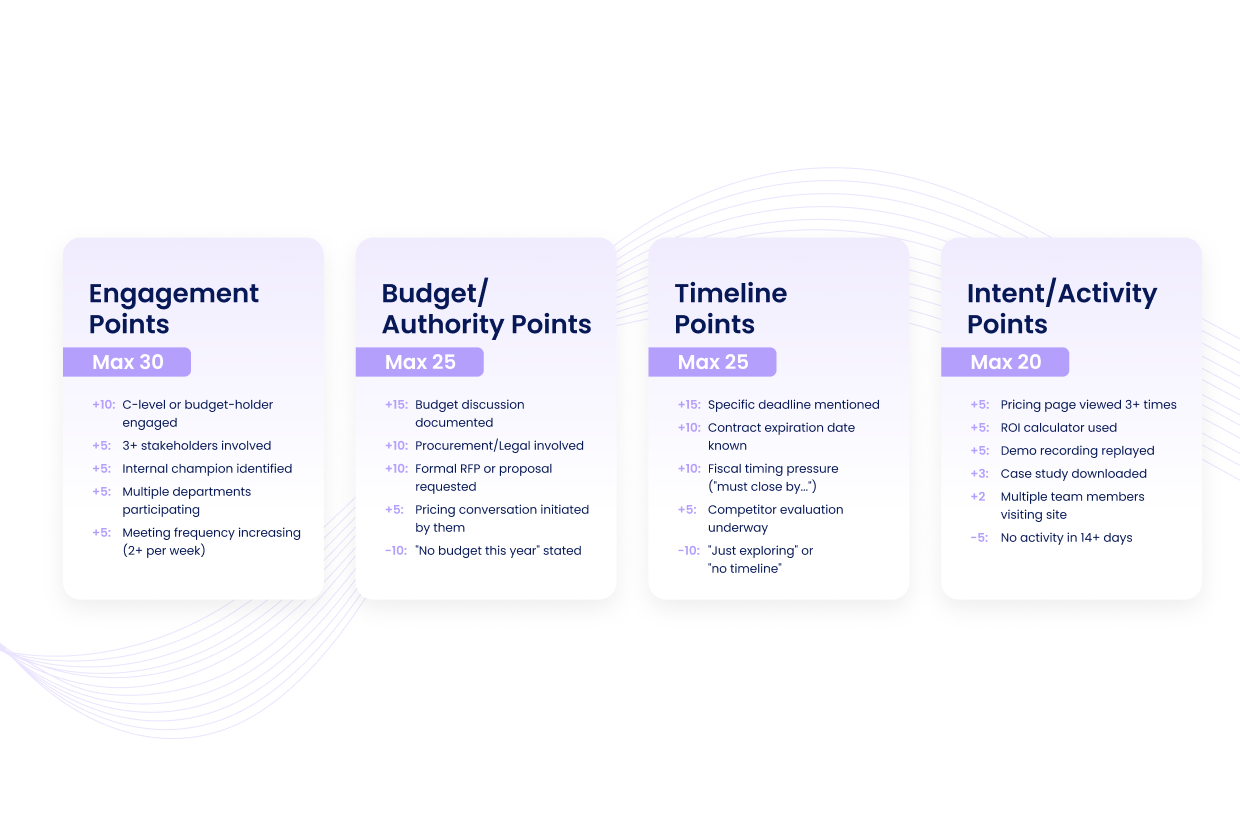
- Engagement Points (Max 30)
- Budget/Authority Points (Max 25)
- Timeline Points (Max 25)
- Intent/Activity Points (Max 20)
→ Total possible: 100 points
Priority tiers:
- 80+ points = Red Hot: Work daily, custom approach, executive involvement
- 60–79 points = Warm: Work 2–3x per week, structured cadence
- 40–59 points = Lukewarm: Automated nurture, check weekly
- Below 40 = Cold: Passive nurture, revisit when score increases
Step 5: Habitualize — Build Your Routine
Scoring is useless if you don't act on it. The goal is to make signal-based prioritization automatic.
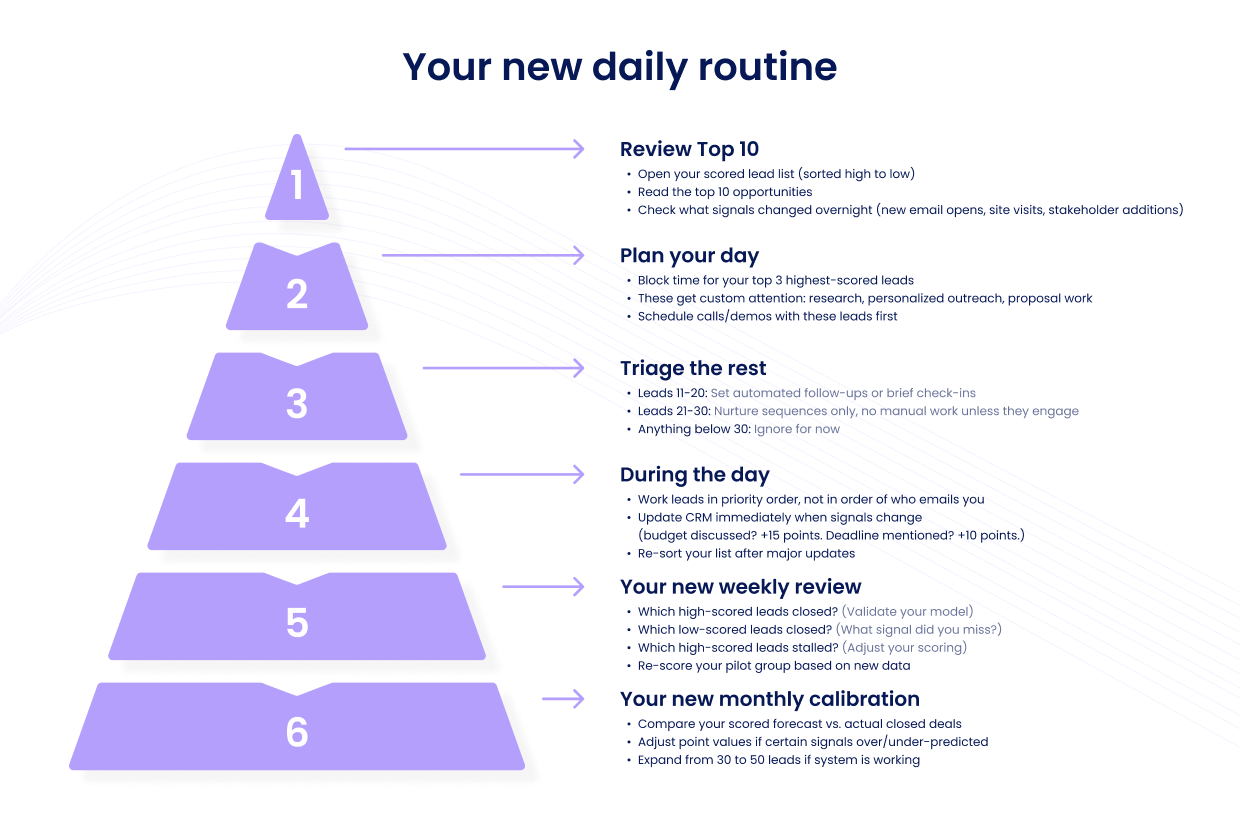
Review Top 10: Each morning, open your scored lead list and focus only on the top 10. These get your best hours and most personalized outreach.
Triage the Rest: For leads scoring 40–59, run a quick structured cadence. For below 40, set automated nurture and don't touch them manually.
During the Day: When a new signal fires (e.g., pricing page visit, new stakeholder added), move the lead up in priority immediately — don't wait for your next scheduled review.
Template: Measure & Optimize
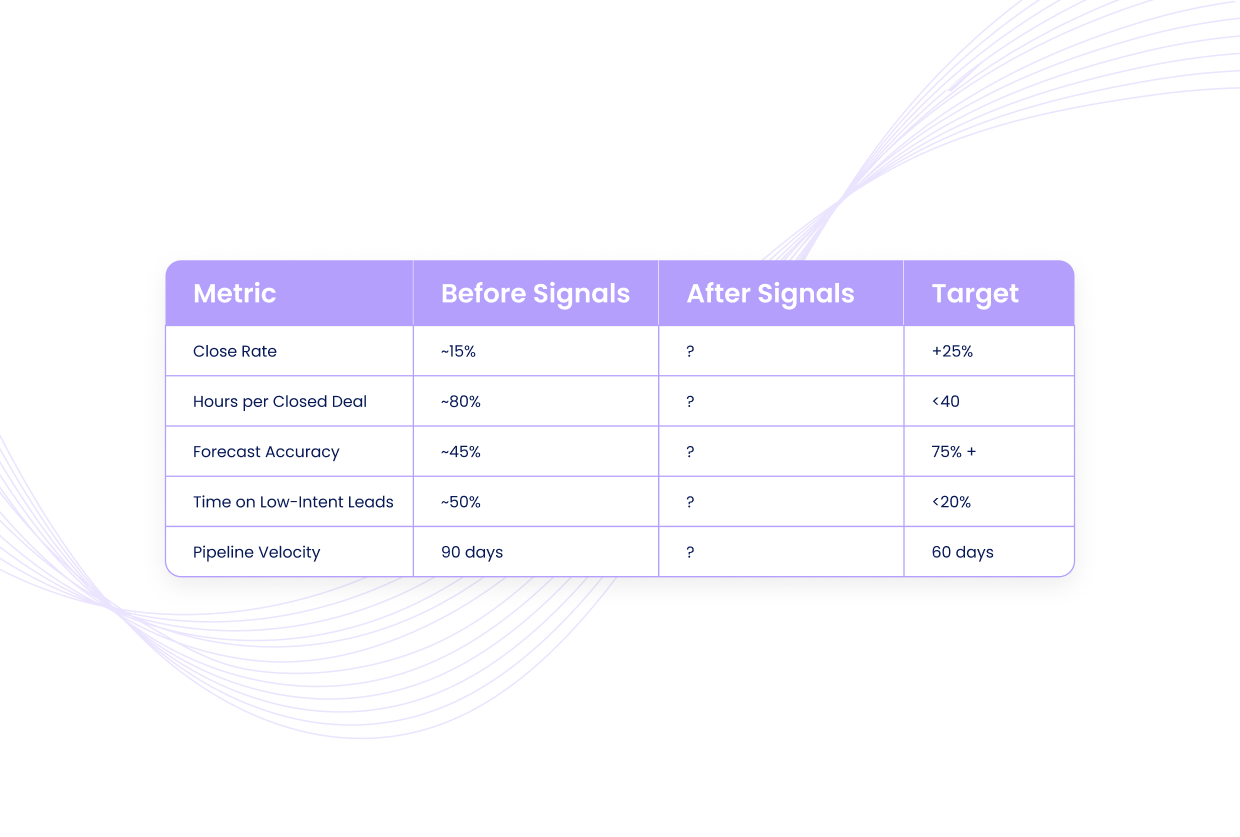
Track these metrics to prove the system works.
→ Baseline your current metrics this week. Set a 90-day check-in to measure improvement.
Before/After comparison (First 90 Days):
Quick Recap

